Installing
Halation is a single self-contained Halation.exe for Windows 10 and 11.
There is no runtime to install, no installer, and nothing written outside your own user
folder. Download it, put it wherever you keep things, and run it.
Releases are not yet code-signed, so Windows will say the publisher is unknown. That is a statement about the certificate, not about the file. Code signing is the next thing on the list; until then, the source is public and the build is reproducible from it.
Settings live in %LOCALAPPDATA%\Halation. That is where the audience
choice, the window position and, if you set one, your encrypted API key are kept.
Deleting that folder resets the application to a first run.
If you used this tool when it was called VibeCheck, those settings are carried across the first time 0.1.4-beta runs. They are copied rather than moved, so the old folder is left exactly as it was and the older build still works if you go back to it.
Two readers
A report answers one of two questions, and you choose which on first run. They are not the same question in two voices, because the disagreement is in the severity rather than the wording.
- Before you ship. The risk in shipping this. Carries rule identifiers, advisory links and remediation.
- Before you install. The risk to you in running it. Drops the identifiers, and leads with what the application can do to your machine.
A committed private key is critical for whoever ships an application and close to nothing for whoever runs it, because it is the author's own key. Shell-opening an unvalidated URL is a shrug for a developer and a program starting on the reader's machine. Reusing one severity ladder for both would get one of them wrong every time.
There is still only one number
Every artifact is scored both ways and the worse of the two readings is the one both reports print. Otherwise an author could scan their own work, switch to the reader that treats them more kindly, and screenshot a number produced for a question they were not asking. The report says what both readings were and which one governed.
You can switch reader on the results screen without rescanning. Both severities were computed during the scan.
How a scan runs
Six stages, in this order:
- Detect what kind of artifact this is.
- Recover as much readable source from it as that kind allows.
- Rules: 39 pattern checks across five families over everything recovered.
- Dependencies: the packages it declares, matched against published advisories.
- Score: a band chosen by the worst finding, positioned by the rest.
- Report: findings, capabilities, coverage, and what could not be checked.
Nothing is executed at any point. An installer is read, never run; a decompiled assembly is turned into text, never loaded.
Recovering the source
Recovery is the binding constraint on everything downstream. A rule cannot fire on code nobody could read.
| Artifact | Recovery | Depth |
|---|---|---|
| Source folder, zip, or repository | read directly | full |
| .NET executable or library | decompiled with ILSpy | full, near-original C# |
| .NET single-file bundle | unpacked from memory, then decompiled | full |
Electron application or .asar | unpacked | full, often unminified |
| NSIS installer | unpacked, then as above | full for Electron and .NET payloads |
| Java archive | decompiled | good |
| Python bundle | readable modules only | partial, and said so |
| Native Windows binary | not possible | signing and hardening flags only |
Installers
Almost nothing is downloaded as a bare executable. An installer is a native stub with
the application attached, so reading only the stub writes off everything worth checking.
Halation unpacks NSIS installers, which is what electron-builder produces,
and hands each payload to the recovery it deserves.
Installers built with Inno Setup, and NSIS installers using solid compression, cannot be unpacked yet. Those say so rather than reporting an empty result.
What cannot be read
A compiled native binary yields nothing, whatever produced it. A Go or Rust executable has nothing to decompile. The report says that in those words, so a low coverage figure means "this was not examined" and never "this was examined and was clean".
Languages and packages
Source is read for C#, JavaScript, TypeScript, Python, Java and Kotlin, plus JSON, YAML,
TOML, XML, HTML, Vue, Svelte, XAML, shell scripts and .env files. Go, Rust,
PHP, Ruby, Swift, Dart, C, C++, Objective-C, SQL, GraphQL, Razor, Astro, Scala, Elixir,
Clojure, F# and Haskell are read too.
33 of the 39 rules carry no language filter, so a Go or Rust file gets
every secret, configuration and malicious-behaviour check. What it does not get is the
injection rules keyed to C# and JavaScript syntax: SQL built by joining strings is
caught in Go and missed in PHP, because PHP concatenates with . and the
pattern was written for +. That is a reason to write more patterns, not a
closed door.
Dependencies are resolved from every lock format worth reading:
- npm:
package-lock.json,yarn.lock(classic and Berry),pnpm-lock.yaml, and vendorednode_modulesmanifests - NuGet:
*.deps.json,packages.lock.json - PyPI:
requirements.txt,Pipfile.lock,poetry.lock - Go:
go.sum - crates.io:
Cargo.lock - Packagist:
composer.lock - RubyGems:
Gemfile.lock - Maven:
gradle.lockfile
A lock file is the only artifact that says what a project actually installed rather than
what it asked for, which is the difference between a dependency that can be checked and
one that cannot. A shipped Electron application has no lock file, so a
package.json under node_modules/ is read as the published
manifest of the package actually present, which is better evidence than a range.
Dependency checks
Out-of-date dependencies are one of the most common real problems in shipped applications, so Halation checks them against OSV.dev at the moment you scan. Findings cite CVE identifiers and link through to the advisory.
What is sent: the package names and versions the application declares, and nothing else. No source, no file contents, nothing identifying you or the artifact.
This is the one part of a scan that needs a network. With no connection, dependencies are not checked and the report says so rather than reporting no known vulnerabilities. There is no offline database to download: bundling one was tried and removed, because a vulnerability database is out of date the day it ships and a stale answer here is worse than an absent one.
When a whole class of check could not run, that is said beside the score rather than four sections below it. An application can otherwise score 100 under "no known issues found" while nothing whatever is known about the packages inside it.
How the score works
The worst finding selects a band, and the accumulated weight of everything else positions the score inside that band with diminishing returns.
| Worst finding | Band | Label |
|---|---|---|
| Critical | 10–39 | Critical issues |
| High | 40–69 | Serious issues |
| Medium | 70–89 | Some issues |
| Low | 90–99 | Minor issues |
| Nothing | 100 | No known issues found |
Capped, never averaged
One critical caps the score at 39 no matter how much else passed. This is the failure it was built against: fifty passing header checks lifting an application that ships a live key into the nineties.
Floored, too
Scores do not bottom out at zero. Before the floor existed, three criticals and forty of them scored identically, and zero asserted that nothing about the application was acceptable, which no static scan can know. It also fixed a mislabel: five highs used to score 0 and be reported as "critical issues", naming a severity that had not been found.
Deterministic only
The score comes from the pattern and dependency checks alone. Whatever the optional AI pass finds is reported in full and never moves the number, because a score that changed with whichever model you had configured could not be compared with anyone else's.
What the AI pass keeps is the power to withhold the all-clear: a result cannot be labelled "No known issues found" while its suggestions sit underneath it. It reads "Nothing from the checks · N AI suggestions to review" instead.
Blocking is separate from the score
An explicit "do not install" comes only from specific high-confidence deterministic rules, never from a low score, and never from the deep pass. It is reserved for findings that endanger the installing user (credential harvesting, wallet theft) rather than the developer. A leaked key is critical but never blocking.
Coverage
Coverage says how much of the application could actually be read, and it is kept deliberately separate from the score. A clean result at 12% coverage is a different claim from a clean result at 95%.
Below 5% coverage no score is produced at all. The band becomes "Could not analyse", rendered grey rather than green, because an artifact that was never read must not look like one that passed.
Coverage measures what was understood, not what was written out. An obfuscated
application decompiles into thousands of files of a.b(c), none of which
count, so it gets no score rather than a good one. The denominator includes code that is
present but unreadable, not only the files that were attempted.
Capabilities and purpose
Updating itself and starting with Windows are how a great many correct programs work. Charging them a band of score was a scanner calling a feature a fault, so they are reported separately under "What this application can do", scored nowhere, and shown open by default to somebody deciding whether to run a download.
For a reader deciding whether to install, these can be the most useful lines in the report: an application that replaces its own code is one whose future behaviour no scan of it describes.
Purpose is affirmed per capability
Reading a browser cookie database is what a password stealer does and what a cleaner does. Rather than asking you to pick from a list of application kinds, which invites picking a flattering one, Halation asks about what it actually observed: "This application reads your browser cookies. Does it have a reason to?"
The report prints your answer back verbatim, so a screenshot of a quiet report still shows what bought the quiet. The top band is qualified to "Nothing beyond what you accounted for" rather than "No known issues found".
The optional deep pass
The main scan is free, needs no account, and sends nothing but package names. The deep pass reads the code and reasons about it, which catches what a pattern cannot express: a guard that exists but is incomplete, whether untrusted input can actually reach a dangerous operation, two individually harmless pieces of code that are unsafe together.
It is off unless you turn it on, per scan, and you bring your own credential. There are three routes: the Claude Code you already have, an Anthropic API key, or any OpenAI-compatible endpoint including a model running on your own machine.
Findings from this pass are labelled AI, carry a confidence level, and
low-confidence ones are dropped rather than hedged. None of them can move the
score or trigger a do-not-install verdict, because the strongest claim in a
report must not depend on whether the reader happened to have a key.
Each route, what it costs, what it sends and how to configure it is on its own page: Deep pass setup. That page also covers picking a local model for your graphics card.
What leaves your machine
All analysis happens where the file already is. Three things can travel, and that is the whole list:
- Package names and versions to OSV.dev, to be matched against advisories. Switchable off.
- A release-list request to GitHub at startup, which sends nothing about you or the machine and compares versions locally. Switchable off on the drop screen.
- The deep pass's files, only if you tick it, only to the provider you chose.
Your code is never uploaded by the main scan. Neither is the artifact, its file names, its hash, or your report. The status bar states what leaves the machine on every screen, not only the one where there is nothing to send yet.
Sending a report somewhere is a separate decision, and one you make by saving a file rather than by ticking anything. Taking a report away covers the four exports, and which of them is safe to post in public.
Taking a report away
One Export report button on the results screen, which asks which of four you want and says what is in each. Nothing is written anywhere until you choose one, and nothing is sent anywhere by any of them: they save a file, and what happens to it afterwards is yours to decide.
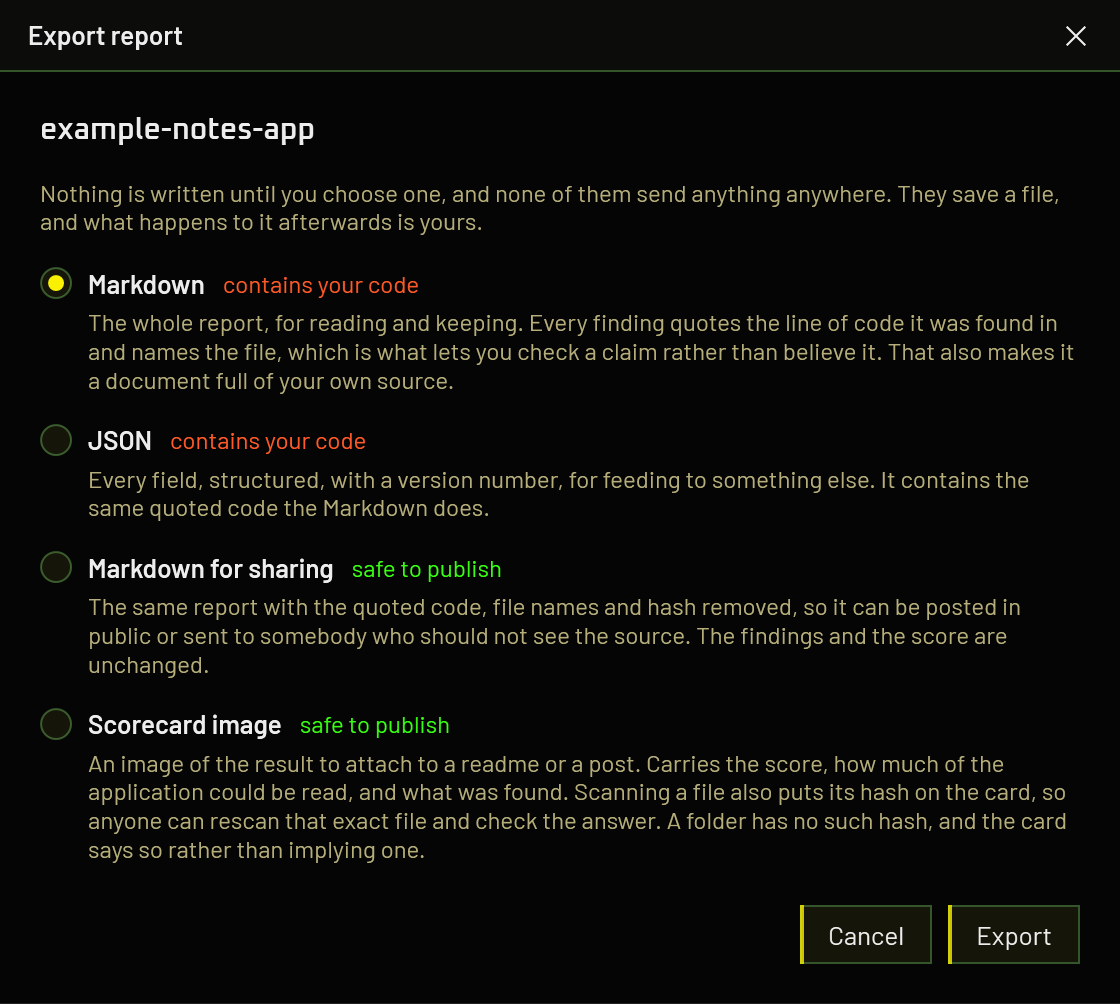
| Export | What it is for | Contains your code |
|---|---|---|
| Markdown | Reading it, keeping it, pasting it into your own notes or a private ticket | Yes |
| JSON | Feeding it to something else. Every field, structured, with a version number | Yes |
| Markdown for sharing | Posting in public, or sending to somebody who should not see the source | No |
| Scorecard image | Attaching to a readme or a post, for showing rather than reading | No |
The scorecard
A 1200 by 630 image carrying the score, the band it falls in, how much of the application could be read, what was found by severity, and, when a file was scanned, the SHA-256 of that file. That last one is the point of it. An image proves nothing by itself and anybody can draw one, so the hash is what lets a reader fetch the same file, rescan it, and see whether they get the same answer. It also names the version that produced it, because the rules change between releases and a score is only reproducible against the build that made it.
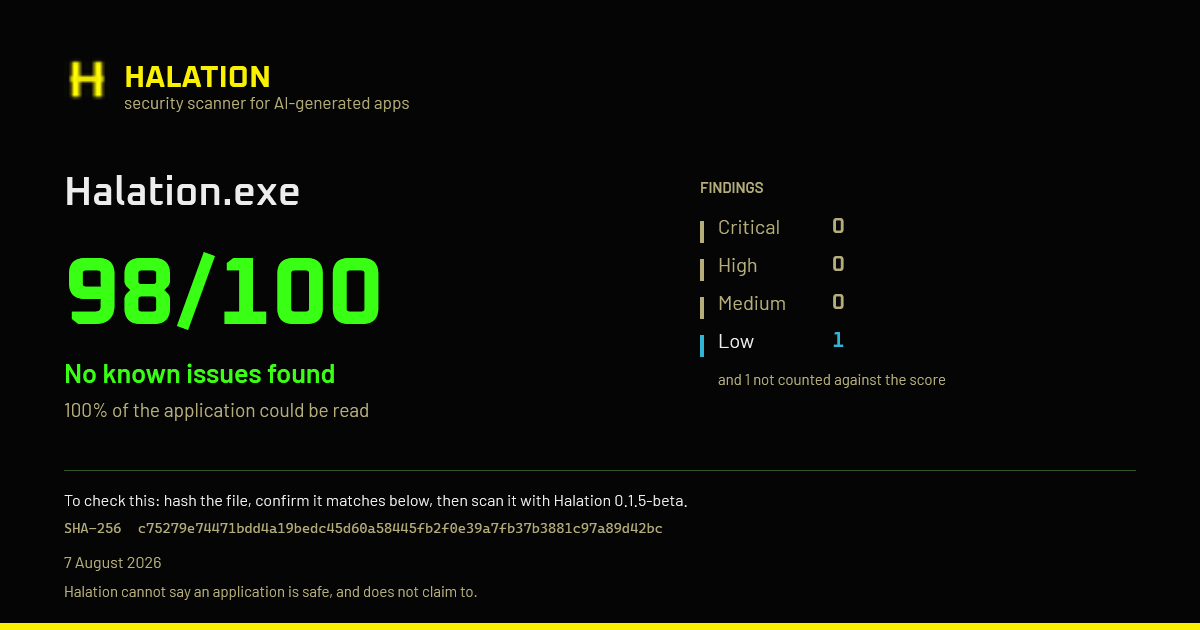
The score never appears on it alone. The coverage figure is the same size beside it, because ninety-nine out of a hundred against 12% of an application is not the same claim as the same number against all of it, and a badge showing only the number invites being read as the second.
Checking somebody else's scorecard
An image is not evidence. Anyone can draw one, and nothing about a PNG is signed. The hash is what makes the claim checkable, and checking it is three steps:
- Get the file the card names, from wherever its author publishes it.
-
Hash it yourself and confirm it matches the SHA-256 on the card. In PowerShell:
Anything other than an exact match means you are not holding the file that was scanned, and the rest of the card says nothing about what you have.Get-FileHash TheirApp.exe -Algorithm SHA256 - Scan that file with the version of Halation named on the card, and compare. The version matters: rules are added between releases, so a later build can legitimately score the same file differently.
Scanning a folder produces no usable hash. There is no single stream of bytes to digest, and the value the scanner keeps internally is a digest of file names and sizes, which two completely different folders can share. Rather than print a number that looks like verification and is not, a scorecard from a folder scan carries no hash at all and says on its face that it cannot name the exact code it read.
If you want a card somebody else can check, scan the built file rather than the source directory.
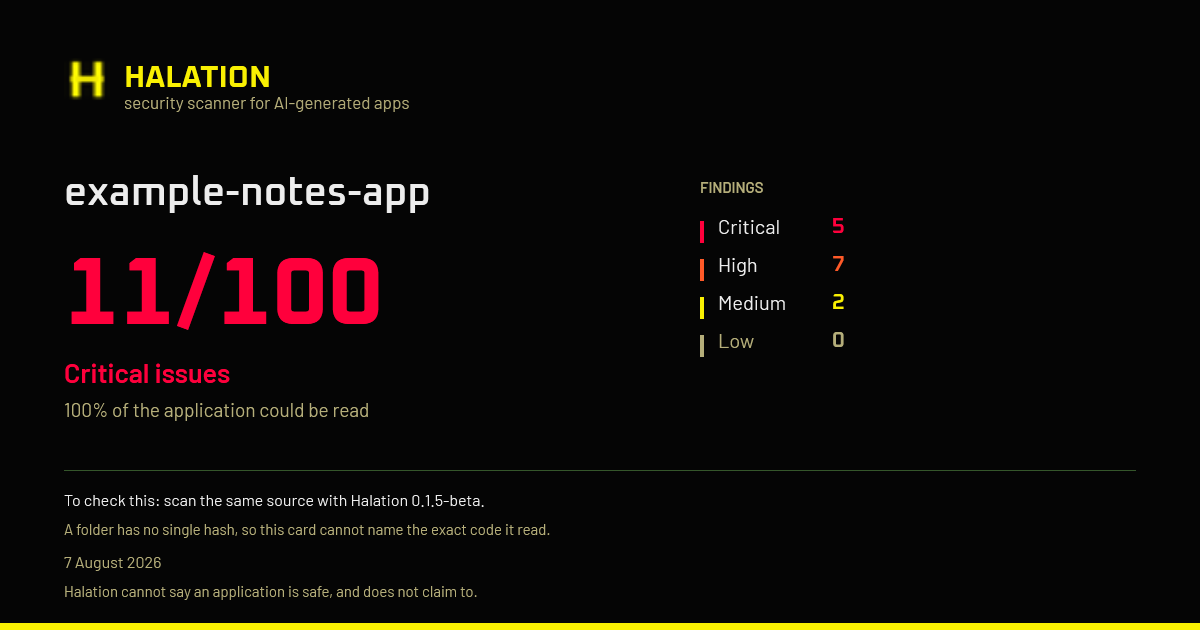
The hash itself is safe to publish. It is one-way, and a file has far too much entropy to work backwards from; it is the same thing projects publish beside a download so people can confirm what they fetched. The only thing it reveals is to somebody who already holds the file, who can confirm it is the one that was scanned, which is the entire purpose.
Why the sharing export exists
Every finding in an ordinary report quotes the line of code it was found in and names the file and line it came from. That is deliberate, and it is the most important thing in the report: it is what lets you check a claim instead of believing it. It also means the ordinary export is a document full of your own source, and sending one to anybody is publishing that source.
That is a real obstacle to something Halation actually needs. Nearly every improvement to this tool has come from somebody pointing it at a real application and finding it wrong, and a report is how you show that. Nobody should have to choose between helping and keeping their code to themselves.
What the sharing copy removes
Taken out
- The quoted lines of code, entirely
- File names and paths
- Line numbers
- The name of what you scanned
- Its SHA-256 hash
Kept
- Every finding, its severity and its rule
- The score, the bands, the coverage figure
- Which checks ran, passed, or could not run
- Timings and file counts
- Your hardware and model, if one ran locally
Findings are not summarised or dropped. A sharing copy lists the same findings, in the same
order, at the same severities, with the same explanations. What goes is the evidence block
and the location; a finding that read "Hardcoded credential ·
src/Auth/Vault.cs:19" above a quoted line becomes "Hardcoded
credential · file 1 (.cs)" with no quotation.
Paths become labels rather than vanishing. The same file keeps the same label throughout, so nine findings in one file still read as nine findings in one file, and the extension stays because the language changes which checks could apply. The label says nothing about what the file is called or where it sits.
It says at the top that it is the redacted one. A shortened report that did not announce itself would be worse than none: anybody comparing two of them would read the missing parts as findings that were not there, which is the exact mistake the rest of this tool is built to prevent.
Wording written by an AI model is kept, and that wording can name things. A model explaining a finding may refer to a method or a class it read. That is a far smaller disclosure than a quoted line, and without it there is nothing left to discuss, so it stays and the file tells you so. Read it before you post it, the same as you would anything else.
Secrets are masked in both copies. A credential the scanner found is never printed back in full, in any export, whatever you do with the file.
Scanning a scanner
A detection tool is a program whose source contains, in quotation marks, every string it looks for. Pointed at its own published build Halation used to score 16/100 and advise against installing itself, on nine findings that were all its own rule table read as the behaviour the rules describe. Antivirus signatures, WAF rules and linter configurations all have this shape.
A match is discounted when it sits inside a string literal and that string is either being handed to a regex constructor or surrounded by enough other pattern definitions to be a catalogue of them. Ordinary code satisfies neither. Measured across four hand-written applications, nothing was discounted in any of them.
A tool that quietly removes its own findings is asking to be trusted about the one thing nobody can check, so the report says how many matches it discounted and why. Secrets are exempt: a credential in quotation marks is a leaked credential wherever it lives, including in the source of a security tool.
Updates
On startup Halation asks GitHub for the public release list and compares it with the build you are running. A newer one gets a strip across the top of the window. Nothing about you or the machine is sent, and the whole check can be switched off.
It will not install a build it cannot verify. Halation's own
VC-MAL-007 tells other applications that an updater must check what it
downloaded against a signature, and not against a hash served from the same place as the
file, so this one is held to that. Until releases are code-signed there is no publisher
to hold a download to, so the strip announces the version and links to the release page
rather than offering to install it. The refusal is stated on screen rather than the
button quietly being absent.
Prereleases are offered only to somebody already running one. A release build is never moved onto a beta because the number happens to be larger.
Building from source
Requires the .NET 10 SDK.
git clone https://github.com/kailoren/halation
cd halation
dotnet test
dotnet run --project Halation.App
A release build is a single self-contained executable with no runtime to install:
dotnet publish Halation.App -p:PublishProfile=win-x64 -o <output folder>
The solution is three projects: Halation.Core holds the whole analysis
engine and is platform-neutral, Halation.App is the WPF interface, and
Halation.Tests covers both. The only third-party analysis dependency is
ICSharpCode.Decompiler, the ILSpy
engine.